In the digital landscape, understanding how to transfer your domain to a website builder is crucial for anyone seeking to establish or enhance their online presence. This process not only enables seamless management of your website but also ensures that your domain aligns with your business objectives. As more individuals and businesses opt for website builders to create their online platforms, being informed about domain transfer becomes increasingly important.
To facilitate this transition, it is essential to grasp the fundamentals of domain transfer, including the prerequisites, the selection of a suitable website builder, and the steps involved in the transfer process. Moreover, recognizing the post-transfer considerations can significantly impact your website’s performance and security.
Understanding Domain Transfer
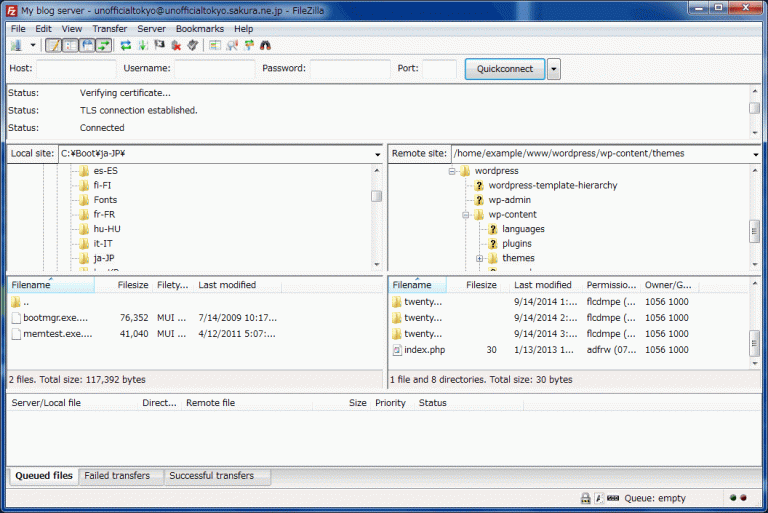
The process of transferring a domain name is a critical aspect of website management that impacts both accessibility and branding. Domain transfer involves moving the registration of a domain name from one registrar to another. This action is significant for individuals and businesses looking to streamline their online presence, improve services, or reduce costs associated with domain management.There are several common motivations for transferring a domain.
Recognizing these reasons can help individuals and businesses make informed decisions regarding their online identity. The following list details some of the primary reasons for domain transfer:
- Desire for Better Pricing: Many registrars offer competitive pricing, prompting users to seek more affordable registration options.
- Improved Customer Support: Users may transfer domains to registrars known for superior customer service and support.
- Consolidation of Services: Businesses may choose to transfer domains to group their services under one registrar for easier management.
- Access to Enhanced Features: Some registrars provide additional features such as advanced DNS management, website builders, or email services that users may find advantageous.
- Reputation and Trust: Transferring to a well-regarded registrar can enhance credibility and trust with customers and stakeholders.
Understanding the distinction between domain registration and website hosting is crucial for effective website management. Domain registration refers to acquiring a domain name and maintaining ownership of that name through a registrar. It is essentially the process of securing a unique address that directs users to a website.On the other hand, website hosting involves storing the website’s files on a server, making them accessible to visitors via the internet.
While both services are essential for an online presence, they serve different purposes. A domain name is like the address of a business, while hosting represents the physical space where the business operates. The relationship between domain registration and hosting can be summarized as follows:
“A domain name directs traffic to your website, whereas hosting provides the infrastructure to serve that content.”
Prerequisites for Domain Transfer
Before initiating a domain transfer, it is crucial to understand and prepare for the necessary steps involved in the process. Ensuring that you have met all prerequisites can help facilitate a smooth transition, minimizing potential disruptions to your online presence.To prepare for a domain transfer, you will need to gather specific information from your current domain registrar and be aware of any fees or limitations that may arise.
This preparation is essential to prevent any delays or issues during the transfer process.
Steps to Prepare for Domain Transfer
Preparation for transferring your domain requires a systematic approach that includes several essential actions. Ensuring that you follow these steps can streamline your experience:
- Verify Domain Eligibility: Check if your domain is eligible for transfer. Domains must typically be registered for at least 60 days before they can be moved to another registrar.
- Unlock Domain: Log into your current registrar account and unlock your domain to allow transfer requests. Most registrars have a feature that needs to be enabled for transfers.
- Obtain Authorization Code: Request the domain authorization code (also known as EPP code) from your current registrar. This code is necessary for initiating the transfer with the new registrar.
- Update Contact Information: Ensure that your domain’s registration information is up-to-date, particularly the email address associated with the domain. This is where transfer-related notifications will be sent.
Information Required from Current Domain Registrar
Gathering the right information from your current registrar is vital for a successful transfer. The following details are generally required:
- Domain Authorization Code: This code verifies that you have the right to transfer the domain.
- Current Registrar Account Details: Access credentials may be needed to unlock the domain and make necessary changes.
- Domain Status: Understanding your domain’s current status can help identify any restrictions or conditions that may impact the transfer.
Potential Fees and Limitations
Awareness of potential fees and limitations can prevent unexpected issues during the transfer process. It is important to consider the following factors:
- Transfer Fees: Some registrars may charge a fee for transferring your domain. This fee often includes extending the domain registration for another year.
- Transfer Locks: Domains are sometimes subject to transfer locks, which prevent transfers within a certain period after registration or previous transfers.
- Pending Payments: Ensure that any outstanding payments or renewal fees with your current registrar are settled before initiating the transfer.
“Being proactive in understanding the prerequisites for domain transfer can significantly ease the overall process.”
Choosing a Website Builder
Selecting the right website builder is a critical step in the process of transferring your domain and establishing an online presence. With various options available, understanding the features, usability, and overall value of each website builder will help align your choice with your business goals. A well-chosen website builder can enhance user experience, streamline website management, and support your business’s specific needs.When considering a website builder, it’s essential to compare their key characteristics such as pricing, available templates, and customer support.
Below is a comprehensive table that Artikels the fundamental features of popular website builders, which can assist in making an informed decision.
| Website Builder | Pricing | Templates | Support | Ease of Use |
|---|---|---|---|---|
| Wix | Starting at $14/month | 500+ customizable templates | 24/7 support, extensive knowledge base | User-friendly drag-and-drop interface |
| Squarespace | Starting at $12/month | 100+ designer templates | 24/7 email support, live chat on higher plans | Intuitive but slightly steeper learning curve |
| WordPress.com | Free basic plan, paid plans starting at $4/month | Thousands of themes available | Email support, community forums | Requires some technical knowledge for customization |
| Shopify | Starting at $29/month | 70+ professional themes | 24/7 support via phone, email, and chat | User-friendly with a focus on e-commerce |
| Weebly | Starting at $6/month | 40+ responsive themes | Email support, chat support on higher plans | Simple drag-and-drop interface |
Choosing a website builder that aligns with your business goals is paramount in ensuring long-term success. For instance, if your primary objective is to establish an e-commerce platform, Shopify may be the most suitable option due to its robust e-commerce features. Conversely, if your focus is on building a portfolio or a blog, Squarespace or Wix may offer the aesthetic flexibility and design options you need.
“The right website builder not only simplifies the process of creating your site but also aligns with your overarching business vision.”
By evaluating these aspects carefully, you can select a website builder that not only meets your immediate needs but also supports the growth and success of your online business in the future.
The Domain Transfer Process
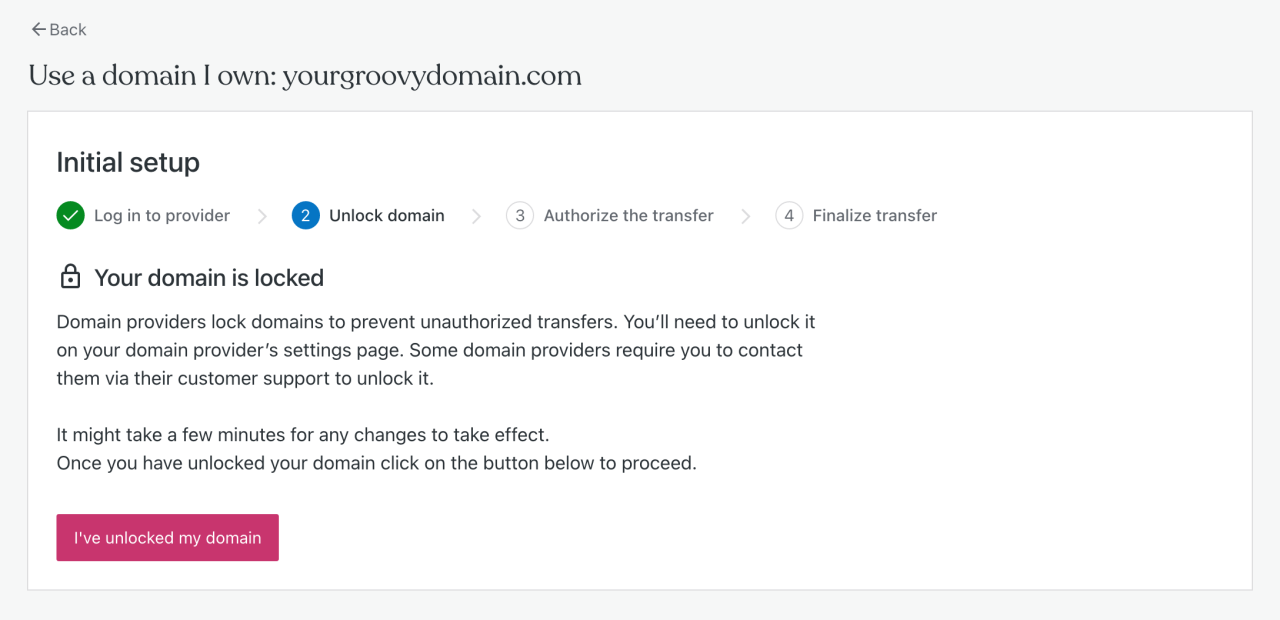
Transferring your domain to a website builder is a straightforward process that requires careful attention to detail. Following a defined step-by-step approach ensures a smooth transition and helps avoid potential pitfalls. Understanding the domain transfer process empowers you to manage your online presence effectively.The domain transfer process involves several critical steps that facilitate the movement of your domain from your current registrar to your chosen website builder.
This includes unlocking your domain, obtaining an authorization code, and coordinating the transfer with your new provider.
Step-by-Step Process for Transferring a Domain
The following steps Artikel the essential actions you need to undertake for a successful domain transfer:
1. Unlock Your Domain
Go to your current domain registrar’s control panel and unlock your domain. This action is necessary to enable the transfer.
2. Obtain the Authorization Code
Request an authorization code (also known as EPP code) from your current registrar. This code is required for verification during the transfer.
3. Initiate the Transfer with Your Website Builder
Go to the website builder’s domain transfer section and enter the domain name you wish to transfer. Provide the authorization code when prompted.
4. Confirm the Transfer Request
Validate the transfer request via email or the control panel of your new provider. This step is crucial for starting the transfer process.
5. Monitor the Transfer Status
Keep track of the transfer status through the website builder’s dashboard. You will receive notifications regarding the progress.
6. Finalize the Transfer
Once the transfer is complete, you may need to configure your DNS settings and renew your domain if necessary.Commonly, domain transfers can take anywhere from a few hours to several days, depending on the registrars involved and the specific circumstances surrounding your domain.
What to Expect During the Transfer
Understanding what to anticipate during the transfer can help ease any concerns. The following points Artikel the expected timeline and notifications:
Initial Notification
You will receive a confirmation email from your current registrar once you initiate the transfer.
Transfer Timeframe
The transfer process generally takes between 5 to 7 days, but it can vary based on the registrars.
Completion Notification
A final confirmation will be sent from both your old registrar and the new website builder once the transfer is complete.
Possible Delays
If there are any issues, such as incorrect authorization codes or domain lock settings, you will be notified promptly to resolve them.
Common Issues and Troubleshooting
During the domain transfer, various issues can arise. Below are some common problems and their solutions:
Domain Locked
If your domain is still locked, you will receive a notification to unlock it. Log into your current registrar’s account to make the necessary adjustments.
Incorrect Authorization Code
If the authorization code is incorrect, the transfer will be halted. Double-check the code provided by your current registrar and re-enter it.
Email Confirmation Not Received
Ensure that the email address associated with your domain is valid and accessible. If not, update it through your registrar’s control panel.
Transfer Denied
If the transfer is denied, it might be due to an unresolved issue with your current registrar. Contact their support for assistance.
“Being proactive in addressing these potential issues can save time and ensure a seamless transition of your domain.”
Post-Transfer Considerations
After successfully transferring your domain to a website builder, several essential actions must be taken to ensure that your website operates smoothly and that your online presence remains uninterrupted. Completing these steps not only secures your domain but also optimizes your website’s performance and accessibility for visitors.Ensuring that all components of your domain and website function correctly post-transfer is vital.
This includes confirming that your website is live, that email services associated with your domain are operational, and that there are no disruptions in services.
Actions to Take Following Domain Transfer
It is crucial to verify the completion of the transfer and the correct operation of your website. The following checklist highlights important aspects to review:
- Check Domain Ownership: Confirm that the domain registration details reflect your name or the organization’s name.
- Verify Website Functionality: Access your website using the domain to ensure it is live and loading correctly.
- Test Email Services: If your domain includes email services, send and receive test emails to confirm everything is functioning as expected.
- Check for 404 Errors: Look for any broken links or pages that may not be displaying correctly due to the transfer.
- Review SSL Certificate: Ensure your SSL certificate is active so that visitors can access your site securely. If it was lost during the transfer, you will need to reinstall it.
Importance of Updating DNS Settings
Updating your DNS settings is a critical step following a domain transfer. Domains use DNS records to guide web traffic and email communications, and failing to update these settings can lead to disruptions. To effectively update DNS settings, follow these steps:
- Access your Domain Management Panel: Log into the control panel of your website builder or domain registrar.
- Locate DNS Management: Find the section labeled ‘DNS Settings’ or ‘DNS Management’ within the control panel.
- Update A Records: Adjust the A record to point to the IP address of your website hosted by the website builder.
- Modify CNAME Records: Ensure CNAME records for subdomains (like www) are accurately set to avoid issues with accessing your website.
- Adjust MX Records: If you are using email services, update MX records to ensure that email is directed to the right servers.
- Save Changes: After making adjustments, save the DNS settings and allow some time (up to 48 hours) for the changes to propagate across the internet.
“DNS settings are the backbone of how your domain functions online; incorrect settings can lead to downtime or service interruptions.”
Maintaining Your Domain
Proper management of your domain post-transfer is essential for ensuring its continued functionality and security. By adopting best practices, you can avoid potential issues and enhance the longevity of your domain ownership.Regular management of your domain includes monitoring its status, securing it against unauthorized access, and ensuring that it remains active through timely renewals. Establishing a routine can help mitigate risks and maintain the integrity of your online presence.
Best Practices for Domain Management and Renewal
To efficiently manage and renew your domain, consider the following best practices:
1. Set Up Auto-Renewal
Most registrars offer an auto-renewal option that can prevent unintentional expiration. Enable this feature to automatically renew your domain before it expires.
2. Keep Contact Information Updated
Ensure that your registrar has your current email address and phone number. This information is crucial for receiving renewal notifications and other important updates.
3. Choose a Long Renewal Period
If possible, opt for a longer renewal period (e.g., 3–5 years) to minimize the frequency of renewal tasks and safeguard against lapses.
4. Use a Reliable Payment Method
Ensure that your payment method is current and valid. Outdated credit card information can hinder the renewal process.
5. Monitor Expiration Dates
Keep a calendar reminder for your domain expiration dates. This proactive measure helps you avoid any lapses in ownership, allowing you to renew on time.
Securing Your Domain
Securing your domain is vital to protecting your online brand and preventing unauthorized access. Implement the following strategies to enhance domain security:
1. Enable Domain Locking
Use the domain locking feature provided by your registrar. This prevents unauthorized transfers and changes to your domain settings.
2. Utilize Two-Factor Authentication (2FA)
Activate 2FA on your registrar account, adding an extra layer of security that requires a second form of verification when logging in.
3. Regularly Review Domain Permissions
Periodically check who has access to your domain management account. Remove any unnecessary permissions to limit exposure to potential threats.
4. Keep Software Updated
If you have a website linked to your domain, ensure all software, including CMS and plugins, are updated to the latest versions to protect against vulnerabilities.
Importance of Monitoring Domain Expiration Dates
Monitoring expiration dates is an indispensable aspect of domain management. Failure to renew your domain on time can lead to loss of ownership and potential downtime for your website. To effectively manage this aspect:
Track Important Dates
Utilize digital tools or calendar applications to track your domain’s expiration date along with any grace periods offered by your registrar.
Review Renewal Policies
Familiarize yourself with your registrar’s renewal policies, including any deadlines for grace periods, to avoid any surprises during the renewal process.
Be Prepared for Changes
Occasionally, registrars may change policies regarding renewal processes or fees. Stay informed to ensure you can adapt quickly.By implementing these best practices, you will enhance the management, security, and longevity of your domain, ensuring a stable and secure online presence.
Last Recap
In conclusion, successfully transferring your domain to a website builder is a vital step in enhancing your online presence. By understanding the transfer process, selecting the right website builder, and taking necessary post-transfer actions, you can ensure a smooth transition that supports your business goals. Remember, maintaining your domain effectively will not only safeguard your website but also help you stay ahead in the ever-evolving digital world.