How to Set Up 301 Redirects for Old Pages is an essential guide for website managers and owners looking to maintain their site’s integrity and optimize user experience. This process is crucial in ensuring that visitors and search engines alike are seamlessly directed to the most relevant content, thus preserving traffic and enhancing . Understanding the mechanics and implementation of 301 redirects is imperative for anyone aiming to improve their website’s performance.
In this comprehensive discourse, we will delve into the significance of 301 redirects, how to effectively set them up using various methods, and best practices to ensure they function optimally. By exploring the nuances of redirect implementation, including monitoring and implications, readers will gain valuable insights that can lead to improved site management and user satisfaction.
Understanding 301 Redirects
A 301 redirect is a permanent redirect from one URL to another, signaling to web browsers and search engines that a page has moved. This type of redirect is essential for maintaining website integrity and preserving the search engine ranking of the redirected page. By informing search engines of the change, a 301 redirect helps ensure that users and search engines are directed to the correct content, mitigating the risk of broken links and user frustration.The distinction between 301 redirects and other types, such as 302 (temporary redirects) and 307 (temporary redirects for HTTP/1.1), is important in web management.
While a 301 redirect indicates a permanent change, a 302 redirect implies that the change is temporary, and the original URL should still be considered the primary source. Consequently, search engines treat 301 redirects differently; they pass on the value accumulated by the original page to the new URL, while this does not occur with 302 redirects.
Scenarios Where a 301 Redirect is Necessary
There are numerous circumstances in which implementing a 301 redirect is crucial. Understanding these scenarios can help website administrators maintain a seamless user experience and preserve effectiveness.
- Website Migration: When a website changes its domain name, a 301 redirect from the old domain to the new one ensures that users and search engines can still access the content without encountering errors.
- Content Consolidation: If similar pages are merged into one, a 301 redirect from the old pages to the new consolidated page prevents users from landing on outdated content.
- URL Structure Changes: When restructuring URLs for better readability or organization, implementing 301 redirects ensures that visitors are guided to the correct new URLs.
- Removing Non-Functional Pages: If a page is deleted or no longer exists, a 301 redirect can be used to guide users to a relevant alternative, maintaining user engagement.
- Switching from HTTP to HTTPS: When a website upgrades to secure HTTPS, 301 redirects from the old HTTP pages to the new HTTPS versions are necessary to maintain security and integrity.
“A 301 redirect is essential for preserving link equity and ensuring a smooth transition for users.”
Setting Up 301 Redirects in .htaccess

To ensure a seamless user experience and preserve rankings when changing URLs, implementing 301 redirects is essential. These permanent redirects inform search engines and visitors that a page has moved to a new location, thus preventing broken links and maintaining traffic flow. The .htaccess file is a powerful tool for managing these redirects on Apache web servers.Accessing the .htaccess file is a straightforward process.
It is typically located in the root directory of your website. To access this file, you can use an FTP client or a file manager provided by your web hosting service. Once you have connected to your server, navigate to the public_html directory or the equivalent directory that contains your website’s files. If you cannot find the .htaccess file, it may be hidden.
Ensure that you enable the option to view hidden files in your FTP client or file manager settings.
Implementing a Basic 301 Redirect
To set up a basic 301 redirect using the .htaccess file, you need to follow these steps:Open the .htaccess file in a text editor.
2. Add the following line of code to redirect a specific old page to a new URL
“` Redirect 301 /old-page.html http://www.example.com/new-page.html “`
Save the changes and upload the modified .htaccess file back to the server.
This will redirect any requests for old-page.html to the specified new-page.html URL, informing browsers and search engines of the permanent change.It’s important to consider various scenarios when setting up redirects. The following table illustrates different redirect syntax examples for various situations:
| Scenario | Redirect Syntax |
|---|---|
| Redirecting a single page | Redirect 301 /old-page.html http://www.example.com/new-page.html |
| Redirecting an entire folder | Redirect 301 /old-folder/ http://www.example.com/new-folder/ |
| Redirecting non-www to www | RewriteEngine On RewriteCond %HTTP_HOST !^www\. RewriteRule ^(.*)$ http://www.example.com/$1 [R=301,L] |
| Redirecting www to non-www | RewriteEngine On RewriteCond %HTTP_HOST ^www\. RewriteRule ^(.*)$ http://example.com/$1 [R=301,L] |
| Redirecting HTTPS to HTTP | RewriteEngine On RewriteCond %HTTPS on RewriteRule ^(.*)$ http://%HTTP_HOST/$1 [R=301,L] |
Incorporating these examples into your .htaccess file can help streamline your URL management, enhance , and improve user experience by ensuring that visitors reach the correct pages without encountering errors.
Implementing 301 Redirects via CMS
Content Management Systems (CMS) play a crucial role in managing website content efficiently and effectively. Many platforms provide built-in features or plugins to facilitate the setting up of 301 redirects, which are essential for maintaining and user experience when old URLs are no longer in use. This discussion focuses on popular CMS options and how to implement 301 redirects within them.
Popular Content Management Systems Supporting 301 Redirects
Several widely-used CMS platforms offer straightforward methods for setting up 301 redirects. Understanding how each system allows for these redirects can greatly enhance site management and performance. Here is a list of popular CMS platforms with their redirection capabilities:
- WordPress
- Joomla
- Drupal
- Magento
- Shopify
Each platform has its own unique steps and tools for implementing redirects, enabling users to maintain effective routing of their web traffic.
Setting Up 301 Redirects in WordPress Using a Plugin
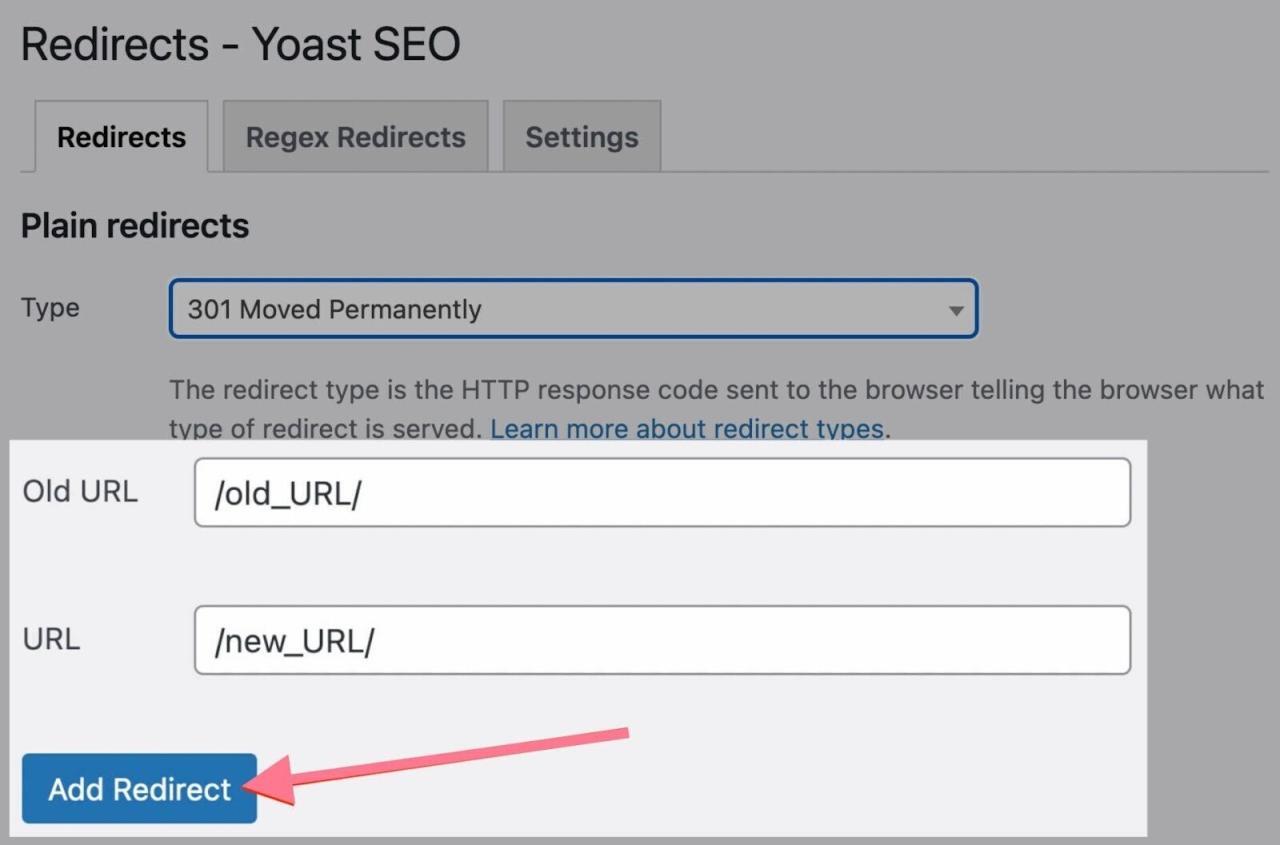
WordPress users can leverage various plugins to simplify the process of creating 301 redirects. One of the most popular plugins for this purpose is “Redirection.” This plugin allows for easy management of redirects and tracks 404 errors. Here are the steps to set up 301 redirects in WordPress using this plugin:
- Install and activate the “Redirection” plugin from the WordPress Plugin Directory.
- Navigate to Tools > Redirection in the WordPress dashboard.
- In the “Add new redirection” section, enter the old URL (the source) in the “Source URL” field.
- Enter the new URL (the target) in the “Target URL” field.
- Click on the “Add Redirect” button to save your changes.
The plugin will now automatically redirect visitors from the old URL to the new URL, ensuring a seamless transition.
Setting Up 301 Redirects in Joomla and Drupal
Both Joomla and Drupal also support 301 redirects, but the methods differ slightly from WordPress. In Joomla, users can utilize the built-in “Redirect” component to manage these redirections effectively. For Joomla:
- Access the Joomla Administrator panel.
- Navigate to Components > Redirects.
- Click on the “Add Redirect” button.
- Fill in the “Old URL” and “New URL” fields as required.
- Save the changes to activate the redirect.
In the case of Drupal, users can implement redirects using modules such as “Redirect” and “Pathauto.” These modules provide functionality to manage URL changes efficiently. The steps for setting a 301 redirect in Drupal generally include:
- Install and enable the “Redirect” module from the Drupal community.
- Go to Configuration > Search and metadata > URL redirects.
- Click on “Add redirect.”
- Input the old and new URLs in the corresponding fields.
- Save the redirect to activate it.
These methods ensure that users can maintain their site’s integrity while effectively managing old and new URLs within their respective platforms.
Testing and Verifying 301 Redirects
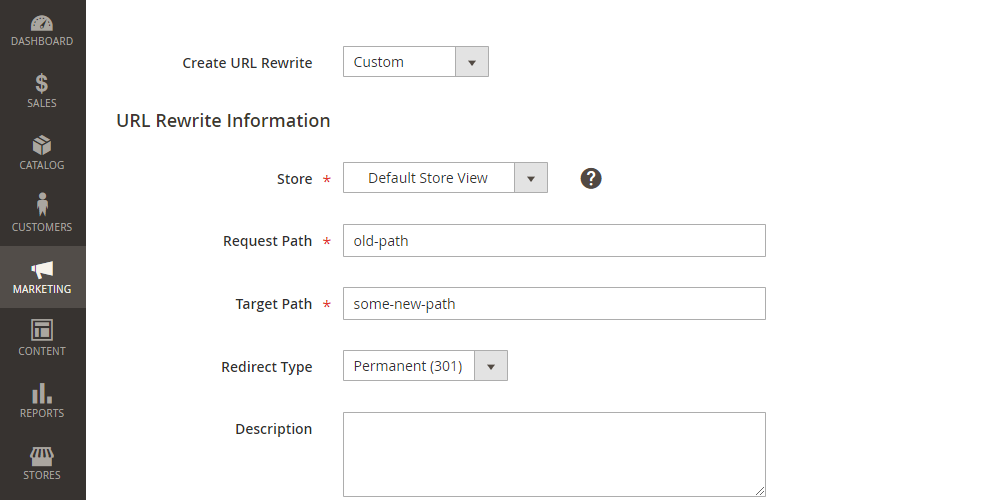
Testing and verifying 301 redirects is a crucial step in ensuring that your redirects function correctly and maintain the integrity of your website’s . A properly configured 301 redirect not only preserves the ranking power of the original page but also guides users seamlessly to the new location of the content. Therefore, it is essential to employ the right tools and techniques to confirm that your redirection is set up correctly.Various tools can assist in testing if a 301 redirect is functioning properly.
These tools allow webmasters to analyze the redirect status, ensuring that users and search engines are directed to the intended URLs.
Tools for Testing 301 Redirects
Multiple tools can be utilized to check the status of your 301 redirects, including:
- Browser Developer Tools: Most modern browsers come equipped with developer tools that allow you to inspect network requests and their statuses.
- Redirect Checker Tools: Online tools like Redirect Checker or HTTP Status Checker can be used to quickly analyze redirect strings.
- Audit Tools: Comprehensive tools like Screaming Frog Spider or SEMrush can scan your site and report on redirect issues.
These tools provide an effective means to monitor and verify the redirection process, helping to identify any potential issues.
Step-by-Step Procedure to Check Redirect Status Using Browser Developer Tools
Utilizing browser developer tools is an efficient way to manually check the status of your redirects. Follow these steps to perform the check:
- Open your browser and navigate to the old URL that should redirect.
- Right-click on the page and select Inspect or use the keyboard shortcut ( Ctrl + Shift + I on Windows or Cmd + Option + I on macOS) to open the Developer Tools.
- Navigate to the Network tab within the Developer Tools.
- Refresh the page to ensure that network requests are being recorded.
- Look for the old URL in the list of network requests. Click on it to view the details.
- Check the Status Code in the details pane. A successful 301 redirect will display a status code of 301 or 308.
- Review the Headers section to confirm that the Location header points to the correct new URL.
Following this procedure enables an immediate assessment of the redirect’s functionality.
Checklist for Ensuring All Redirects are Functioning as Intended
Upon setting up 301 redirects, it is advisable to perform a thorough check to ensure that every redirect works correctly. To assist with this process, here is a checklist to follow:
- Confirm that all old URLs are correctly mapped to their new counterparts.
- Verify that each redirect produces a status code of 301 or 308.
- Ensure the new URLs are resolving correctly and displaying the desired content.
- Check for any redirect chains or loops that may cause delays or errors.
- Test redirects on different devices and browsers to ensure compatibility.
- Monitor the redirects periodically to ensure they remain functional over time.
By adhering to this checklist, you can effectively confirm that your 301 redirects are operating smoothly and efficiently, safeguarding both user experience and integrity.
Best Practices for 301 Redirects
Implementing 301 redirects is crucial for maintaining your website’s search engine optimization and user experience during changes or updates. Adhering to best practices will ensure that the transition is smooth and beneficial for both users and search engines.When setting up 301 redirects, it is important to follow certain best practices to avoid common pitfalls and to maintain effective user experiences.
By implementing these practices, you can enhance your website’s performance and retain valuable traffic.
Considerations for Effective 301 Redirects
To maintain a good user experience with redirects, consider the following key points:
- Limit Redirect Chains: Avoid creating multiple redirects for a single URL. Each additional redirect can slow down page loading times and adversely affect user experience.
- Use a 1:1 Redirect Ratio: Ensure that each old URL redirects to a relevant new URL. This relevance helps retain the context of the original page and maintains user satisfaction.
- Update Internal Links: Update any internal links to point directly to the new URLs rather than relying on redirects. This improves site performance and helps search engines crawl your site more efficiently.
- Test Redirects Thoroughly: Before finalizing the implementation, test each redirect to ensure it directs users and search engines to the correct destination without issues.
- Monitor Traffic and Performance: After implementing redirects, regularly monitor their performance through analytics tools. This helps identify any potential issues early and allows for adjustments as needed.
It is essential to be aware of common pitfalls during the setup process. Failing to avoid these pitfalls can lead to negative impacts on both and user experience.
“Redirects should guide users seamlessly from old content to new, ensuring that no valuable traffic is lost in the transition.”
Ensuring that you adhere to these best practices will help create a seamless experience for users while preserving the integrity of your website’s .
Monitoring and Updating Redirects
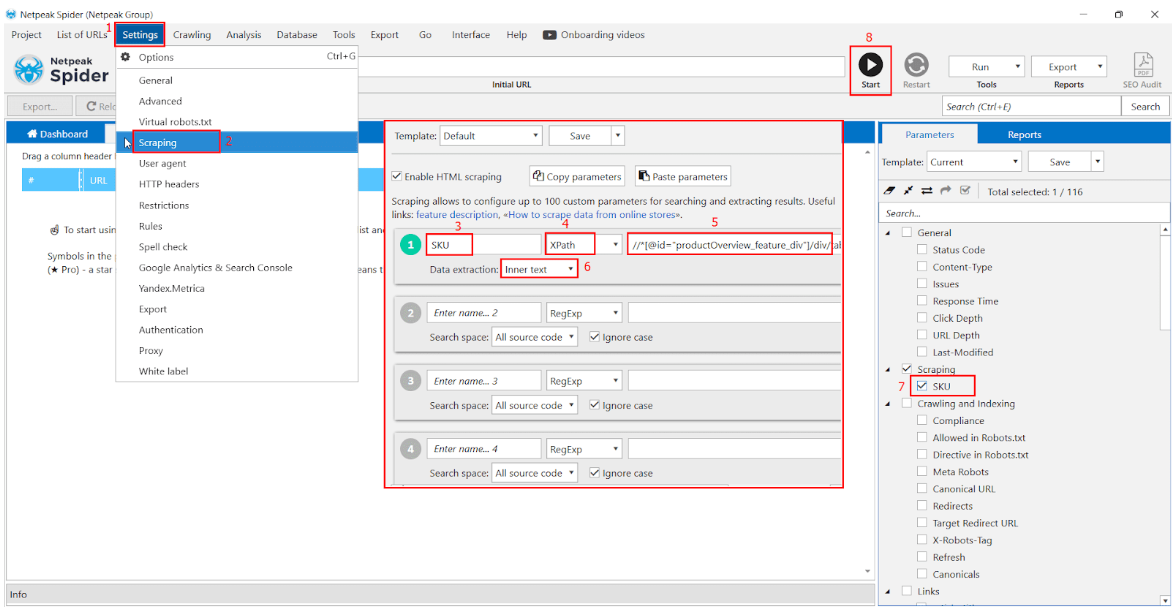
Monitoring the performance of 301 redirects is essential for maintaining the integrity and effectiveness of a website’s strategy. Over time, user behavior, search engine algorithms, and content relevance can change, which means that redirects must also be evaluated and updated to ensure they continue to serve their intended purpose. Regular monitoring helps in identifying issues that could lead to a decline in traffic or user experience.To effectively evaluate the performance of 301 redirects, certain key metrics should be tracked.
This provides insights into the efficacy of each redirect and helps in making informed decisions regarding any necessary updates.
Key Metrics for Evaluating Redirect Effectiveness
Tracking a variety of metrics is crucial to understanding how well your 301 redirects are functioning. Below are some important metrics to monitor:
- Traffic Volume: Monitor the overall traffic to both the old and new URLs to see if the redirect is successfully channeling visitors to the intended page.
- Bounce Rate: Analyze the bounce rates post-redirect to understand if users are finding what they need on the new page or if they are leaving quickly.
- Conversion Rate: Assess how well the new page is converting visitors compared to the old page, indicating whether the content meets user needs.
- Search Engine Rankings: Keep an eye on the rankings of the new URL to see if it stabilizes or improves over time, reflecting the effectiveness of the redirect.
- 404 Errors: Regularly check for any 404 errors that may occur when users attempt to access the old page, which indicates potential issues with the redirect.
In addition to tracking these metrics, a structured approach to regularly review and update redirects is necessary to maintain their relevance. This involves developing a clear plan that encompasses frequency and criteria for reassessment.
Plan for Regularly Reviewing and Updating Redirects
Establishing a routine for reviewing redirects ensures they remain effective and aligned with current content strategies. The following plan Artikels steps to undertake periodic audits:
- Set a Schedule: Determine a regular schedule for reviewing redirects, such as quarterly or bi-annually, depending on the volume of changes on the website.
- Analyze Performance Data: Use analytics tools to assess the performance metrics identified earlier, focusing on trends and anomalies.
- Check Relevance: Review the content of the new pages to ensure they are still relevant to the intended audience and aligned with current practices.
- Update or Remove Redirects: Update any redirects that are pointing to outdated content or that have low performance. Remove redirects that no longer serve a purpose or redirect traffic to irrelevant pages.
- Document Changes: Maintain a record of all redirects and any modifications made during the review process for future reference and analysis.
By consistently monitoring and updating 301 redirects, website owners can enhance user experience, preserve value, and adapt to evolving digital landscapes. This proactive approach ensures that the website remains relevant and continues to effectively guide users to the desired content.
Impact of 301 Redirects on
Properly implemented 301 redirects can significantly influence a website’s search engine optimization () performance. Understanding their impact is crucial for maintaining and improving search rankings, preserving link equity, and ensuring a positive user experience. A 301 redirect is a permanent redirect that tells search engines and users that a page has moved to a new location, effectively passing the original page’s ranking power to the new one.The effect of 301 redirects on search engine rankings and link equity is profound.
When a 301 redirect is implemented, the search engines transfer the majority of the link equity, which is the value passed from one page to another based on the number and quality of backlinks, from the old page to the new URL. This transfer helps the new page retain its rankings much like the original page would have, thereby mitigating the risk of losing traffic and visibility in search engine results.
Long-term Benefits of Properly Implemented 301 Redirects
The long-term benefits of using 301 redirects are essential for both user experience and . Implementing these redirects correctly can lead to increased organic traffic, improved rankings, and enhanced user satisfaction. Below are notable advantages:
- Preservation of Traffic: By redirecting users and search engines to the new page, businesses can maintain existing traffic levels that may otherwise decline due to broken links or removed pages.
- Improved User Experience: Redirects enhance navigation by guiding users seamlessly to the content they are seeking, thereby reducing bounce rates.
- Consolidation of Link Equity: Effective redirects prevent the dilution of link equity, ensuring that the authority built by the old page contributes to the new page’s rankings.
- Enhanced Site Structure: 301 redirects can also facilitate better site architecture and organization, which is beneficial for both users and search engines.
Effects of 301 Redirects Versus Not Using Redirects
The decision to implement 301 redirects versus leaving old pages without any redirects can have starkly different impacts on performance. Not utilizing redirects can lead to significant losses in traffic and rankings. The following points Artikel the contrasting outcomes:
- Loss of Traffic: Without redirects, users clicking on outdated links will encounter 404 errors, which can lead to frustration and a potential loss of returning visitors.
- Decreased Rankings: Search engines may interpret abandoned URLs as signs of neglect, leading to lower rankings for the related content.
- Negative User Experience: Users expect to find relevant content linked from other sites; broken links can damage credibility and trust.
- Link Equity Loss: By failing to implement redirects, any link equity associated with the old URL is not transferred, which can weaken the new page’s authority.
“It is crucial to ensure that 301 redirects are executed properly to maximize their benefits for and user experience.”
Ending Remarks
In conclusion, mastering the setup of 301 redirects is not only a technical necessity but also a strategic advantage in the realm of web management. By applying the techniques discussed, website owners can safeguard their online presence, enhance user experience, and boost search engine rankings. As you embark on this journey, remember that regularly monitoring and updating your redirects will keep your site relevant and efficient, ultimately leading to sustained success.